Why Your Query Is Slow: MySQL Indexes from First Principles
Same query, three indexes: 289 ms, 219 ms, 0.065 ms. A measured tour of composite indexes, the leftmost-prefix rule, covering indexes and the N+1 your ORM hides.

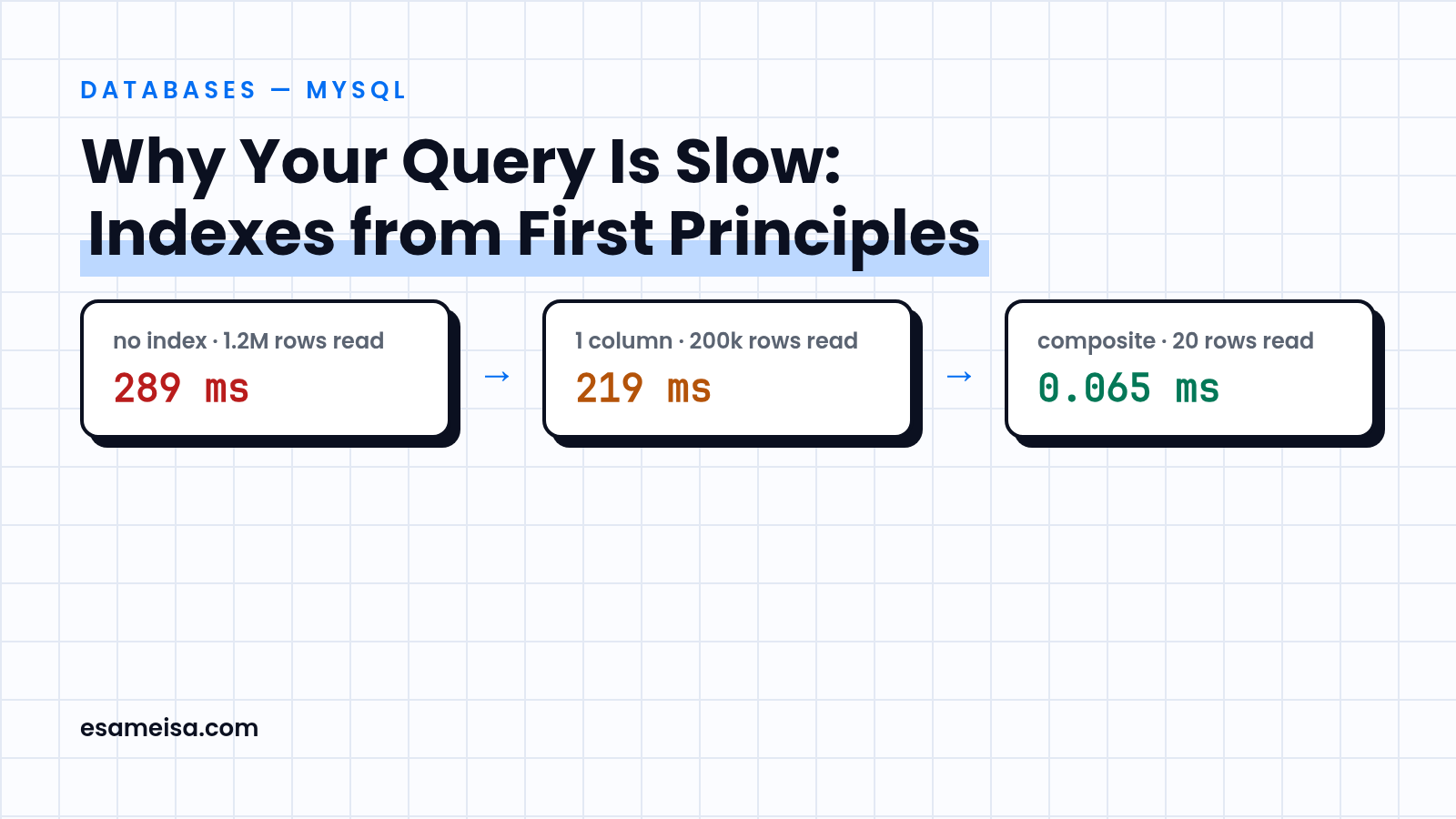
Table of contents
- The lab
- How to read EXPLAIN before touching anything
- Experiment 1: no index vs single column vs composite
- The leftmost-prefix rule (and a wrong-order index is dead weight)
- Covering indexes: skip the row lookups entirely
- The N+1 your ORM hides from you
- Common mistakes
- Checklist for your next slow query
- Key takeaways
- References
The lab#
Every number below is measured, not remembered. The setup, so you can reproduce or challenge it:
- MySQL 8.4.9 (Oracle's 8.4 LTS), InnoDB, on a small sandbox VM (2 vCPU, 2 GB RAM, shared CPU)
- The ORM section runs on a scratch Laravel 13.40.0 app on PHP 8.4.27 against the same server, in its own throwaway database, dropped right after the run
- An
orderstable with 1,200,000 rows: 50,000 users with ~20 orders each, plus one "hot" user4242with 200,016 orders (skewed distributions are the norm in real systems) - Warm InnoDB buffer pool; times are medians of 3
EXPLAIN ANALYZEruns, in milliseconds
The query under test - "the 20 most recent orders of a user":
SELECT * FROM orders
WHERE user_id = 4242
ORDER BY created_at DESC
LIMIT 20;
How to read EXPLAIN before touching anything#
EXPLAIN shows the planned access path; EXPLAIN ANALYZE (MySQL 8.0.18+) actually executes the query and shows real rows and real time per step. Four fields do most of the work:
- type:
ALLmeans full table scan (almost always the problem);ref/range/constmean an index is being used. - key: which index the optimizer picked - and
possible_keyswhich it ignored. - rows: estimated rows it will read. Compare with the rows your query actually needs.
- Extra:
Using filesort(a separate sort pass),Using temporary, or the good ones -Using index(covering index, no row lookups) andBackward index scan(reading a descending range straight from the index).
Experiment 1: no index vs single column vs composite#
Run 1 - no secondary index. MySQL reads all 1.2M rows, keeps the 200,016 belonging to user 4242, sorts them, returns 20:
-> Sort: orders.created_at DESC  (actual time=289..289 rows=20)
    -> Filter: (orders.user_id = 4242)  (rows=200016)
        -> Table scan on orders  (rows=1.2e+6)
Run 2 - ADD INDEX idx_user (user_id). The lookup jumps straight to the user's rows - but they're stored in index order (by user_id only), so MySQL still reads all 200,016 of them and sorts 200k rows to find the latest 20 (Using filesort):
-> Sort: orders.created_at DESC  (actual time=219..219 rows=20)
    -> Index lookup on orders using idx_user (user_id=4242)  (rows=200016)
Run 3 - ADD INDEX idx_user_created (user_id, created_at). Now the index itself is sorted exactly the way the query asks: first by user_id, and within each user by created_at. MySQL walks the index backwards from the newest entry of user 4242 and stops after 20 rows. No scan, no sort:
-> Index lookup on orders using idx_user_created (user_id=4242) (reverse) (actual time=0.013..0.064 rows=20)| Index | Plan | Rows read | Median time |
|---|---|---|---|
| none | Table scan + sort | 1,200,000 | 289 ms |
(user_id) |
Index lookup + filesort | 200,016 | 219 ms |
(user_id, created_at) |
Backward index scan, stop at 20 | 20 | 0.065 ms |
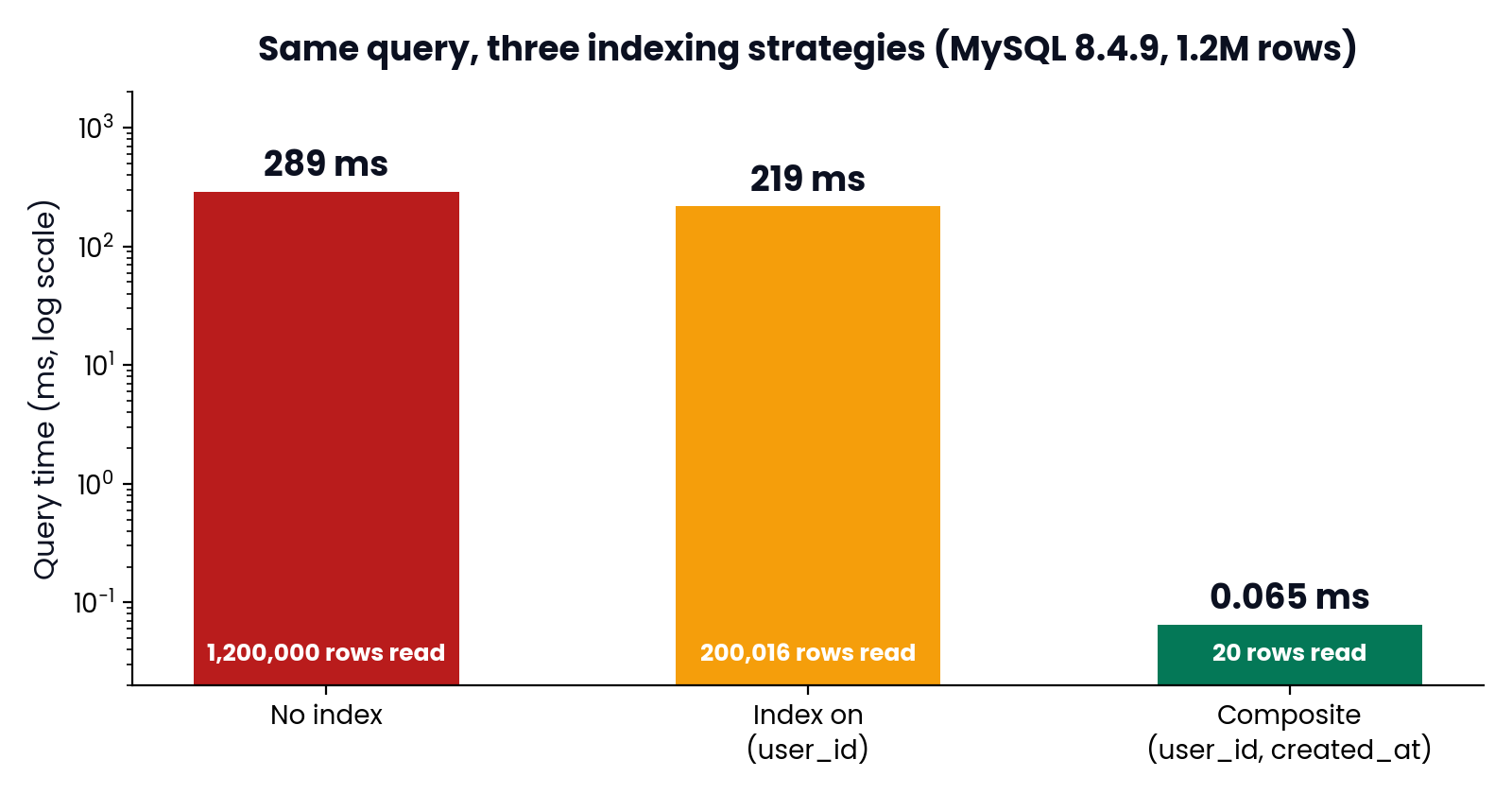
The single-column index was only ~24% faster. The composite index was ~4,400x faster (289 ms vs 0.065 ms, medians of three runs each). Indexes don't help "in general" - they help the queries they were designed for.
The leftmost-prefix rule (and a wrong-order index is dead weight)#
MySQL's own manual puts it precisely: a composite index works for queries that test all its columns, or the first, the first two, the first three, and so on. Think of the index as a sorted array of concatenated values - you can only seek into it from the left.
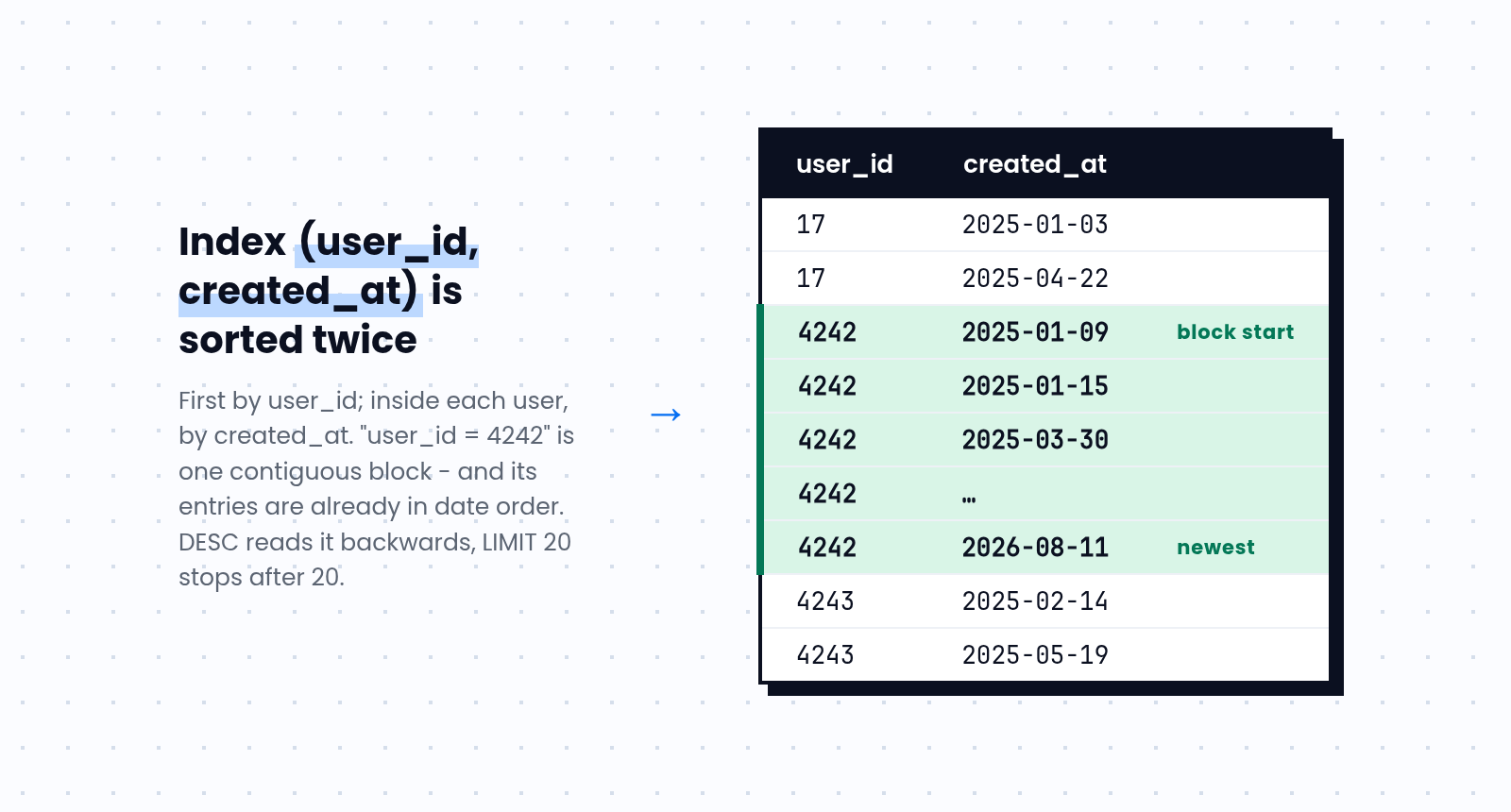
Proof from the lab: with only idx_created_user (created_at, user_id) available (note the reversed order), our query ignores it - possible_keys is just idx_user, and we get the same 217 ms lookup + filesort. The index can't answer "user_id = 4242" because its leftmost column is created_at.
But that same "wrong" index is perfect for a different query - newest orders since June, across all users:
-> Index range scan on orders using idx_created_user over ('2026-06-01' <= created_at) (actual time=0.021..0.087 rows=20)0.09 ms, 20 rows read. Rule of thumb: equality columns first, then the range/sort column - and design each composite index for a specific query pattern, not for the table in the abstract.
Covering indexes: skip the row lookups entirely#
A secondary index entry points back to the full row (the clustered primary key). If your SELECT list needs columns that aren't in the index, MySQL pays one extra row lookup per row. Include everything the query reads and the Extra column shows Using index - the query never leaves the index:
ALTER TABLE orders ADD INDEX idx_cover (user_id, created_at, total_cents);

SELECT user_id, created_at, total_cents
FROM orders WHERE user_id = 4242 AND created_at >= '2026-06-01';
Measured on the 27,985 matching rows:
| Index used | Plan | Median time |
|---|---|---|
(user_id, created_at) + row lookups |
Index range scan + row fetches | 85.6 ms |
(user_id, created_at, total_cents) |
Covering index range scan (Using index) |
8.8 ms |
~10x, just by not touching the rows. This is also why SELECT * defeats covering indexes by design.
The N+1 your ORM hides from you#
The same "rows read vs rows needed" logic explains the classic Eloquent N+1. I ran both patterns in a scratch Laravel 13.40.0 app (PHP 8.4.27, MySQL 8.4.9, 100 users / 500 orders, median of 5 runs, query log counting). This lazy pattern:
$orders = Order::latest('created_at')->limit(10)->get();   // 1 query
foreach ($orders as $order) {
    echo $order->user->name;                               // +1 query PER order
}
executed 11 queries at 2.82 ms; the eager Order::with('user')->latest('created_at')->limit(10)->get() executed 2 queries at 0.78 ms. Same data either way - the difference is 9 extra round-trips, and the gap grows with every order you add (and with real network latency between app and database). In development, Model::preventLazyLoading() turns these silent extra queries into loud exceptions.
Common mistakes#
| Mistake | Symptom | Fix |
|---|---|---|
| One index per column | Queries filter two columns, only one index used | Composite indexes built per query pattern |
| Equality column after range column | Index partially used, filesort remains | Equality first, then range/sort column |
SELECT * everywhere |
Covering indexes never possible | Select only the columns you need |
| Trusting estimates blindly | rows says 1, reality says 200k |
Use EXPLAIN ANALYZE, keep stats fresh with ANALYZE TABLE |
| Indexing low-cardinality columns alone | Huge scans through millions of "pending" rows | Index selectivity; composite with the selective column |
| Lazy-loading in loops (N+1) | 100 rows, 101 queries | Eager load: with(), load() |
Checklist for your next slow query#
- Reproduce it, then run
EXPLAIN ANALYZE- not justEXPLAIN -
type = ALLon a big table? You need an index or a betterWHERE -
Using filesort+ORDER BY? Add the sort column to the composite index after the equality columns - Rows read >> rows returned? Wrong or missing index
- Selecting few columns? Consider a covering index
- Fixed it? Add the query shape to code review so the index and the query evolve together
Key takeaways#
- Slow queries read too many rows. Everything else - indexes, covering indexes, eager loading - is a way to read fewer.
- A composite index is sorted left to right: equality columns first, then the range/sort column. Wrong order = unused index.
EXPLAINestimates;EXPLAIN ANALYZEmeasures. Optimize against measurements.- The right index took our query from 289 ms to 0.08 ms. The wrong-but-plausible one bought almost nothing. Details are the whole game.
References#
- MySQL 8.4 Reference Manual - Multiple-Column Indexes
- MySQL 8.4 Reference Manual - ORDER BY Optimization
- MySQL 8.4 Reference Manual - EXPLAIN Statement
- Use The Index, Luke - Anatomy of an SQL Index
Fighting a slow query in production right now? This is exactly the kind of thing I work on - see how we could work together.