Learning to Code with AI Without Becoming Dependent: A 12-Week Roadmap
AI can ship your code without teaching you anything. A 12-week roadmap for learning backend development with AI as a tutor, not a crutch, with prompts, projects, exercises and a self-assessment rubric.

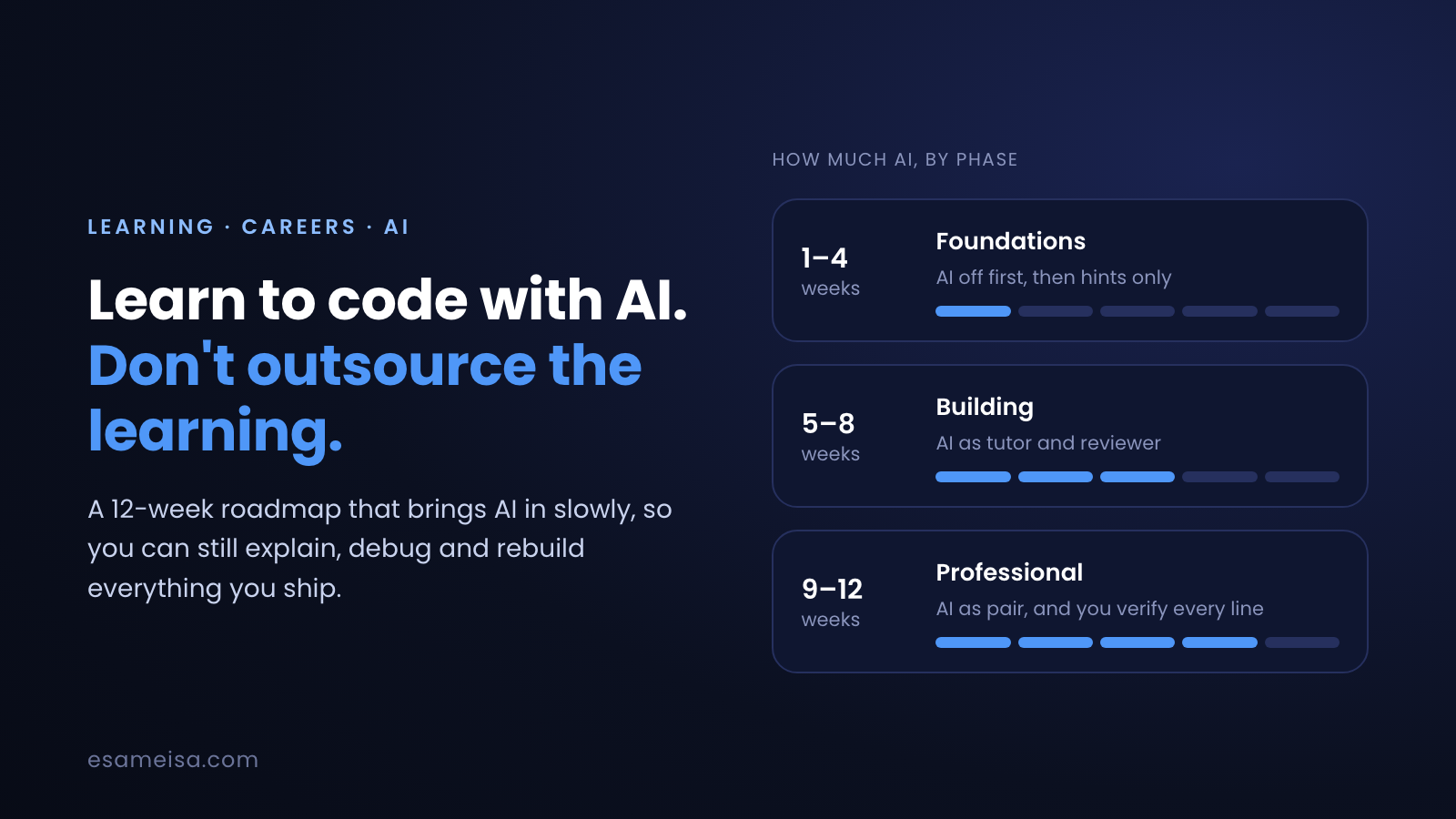
Table of contents
- The problem: shipping isn't the same as learning
- It's not "AI or no AI". It's how you use it
- Why struggling works
- The learning loop: Struggle → Ask → Explain → Rebuild
- Set up your AI as a tutor, not a code generator
- The 12-week roadmap
- Phase 1: Foundations (weeks 1–4). AI off first, then hints only
- Phase 2: Building (weeks 5–8). AI as tutor and reviewer
- Phase 3: Professional (weeks 9–12). AI as pair programmer, you verify
- A realistic week
- Practise the skills AI can't give you
- Exercise 1: predict the output
- Exercise 2: review AI-generated code
- Exercise 3: break it on purpose
- Measure yourself: the self-assessment rubric
- Keep a learning log
- Common mistakes
- For mentors and team leads
- Your checklist
- Key takeaways
- References and further reading
Imagine a junior developer, let's call her Mona, three months into learning backend development. With an AI assistant she has built a booking app with authentication, an admin panel and a payments page. It works, and it looks great on GitHub.
Then comes her first technical interview. The interviewer opens one of her controllers and asks a simple question: "Why is this query inside the loop, and what happens with 1,000 bookings?" Mona doesn't know. She didn't write that loop. She accepted it.
(Mona is a composite, not a real person. But if you are learning to code right now, you have probably felt the gap between what you can ship and what you can explain.)
AI coding assistants are the best learning tool programmers have ever had, and also the easiest way to skip the learning entirely. This article gives you a 12-week roadmap that uses AI to learn faster without handing it your understanding. It includes copy-ready prompts, weekly projects, exercises, a self-assessment rubric and a learning-log template.
The problem: shipping isn't the same as learning#
When you are learning, the code is not the product. Your brain is the product. The code is just evidence that learning happened, and AI can produce the evidence without the learning.
This is no longer just an opinion. Several recent studies point the same way:
- Anthropic's randomized trial (January 2026). 52 mostly junior engineers learned Trio, an unfamiliar Python library. Those allowed to use AI scored 50% on a quiz afterwards; those who coded by hand scored 67%. The AI group was not significantly faster either, about two minutes quicker on average, a difference that wasn't statistically significant. The biggest gap was on debugging questions.
- Microsoft Research (CHI 2025). In a survey of 319 knowledge workers, higher confidence in AI went with less critical thinking, and higher self-confidence went with more.
- Stack Overflow Developer Survey 2025. 84% of developers use or plan to use AI tools, but more distrust their accuracy (46%) than trust it (33%). The top frustration, at 66%, is AI solutions that are "almost right, but not quite", and 45% say debugging AI-generated code takes more time. 20% say they've become less confident in their own problem-solving.
Put those together and you get the trap: AI gives you code that is almost right, and spotting the "almost" requires the exact skills (debugging, reading code, judgement) that you don't build if AI does all the work.
It's not "AI or no AI". It's how you use it#
The most useful part of the Anthropic study isn't the average. It's what happened inside the AI group. The researchers grouped participants by how they used the assistant, and the patterns told very different stories:
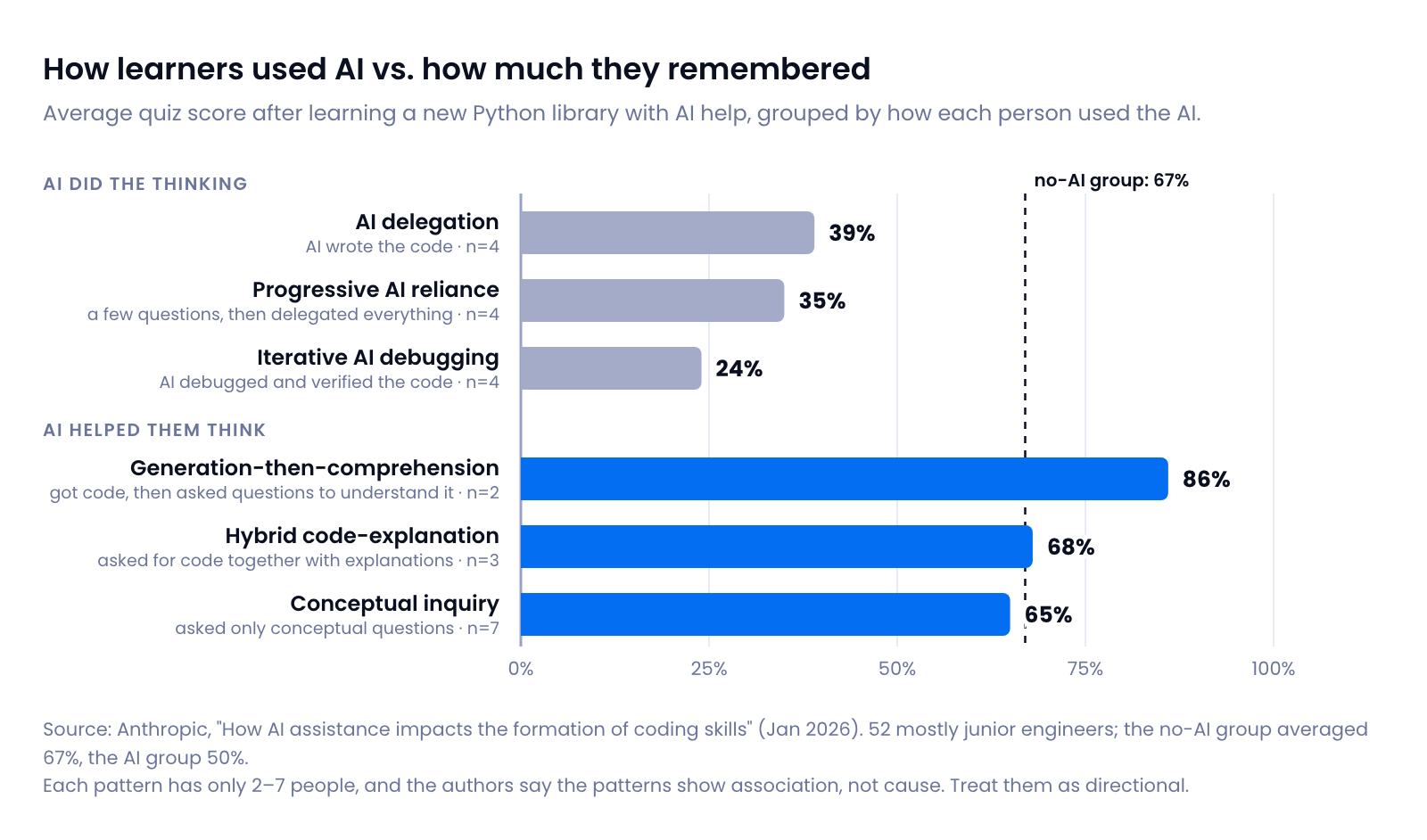
People who let the AI do the thinking (writing the code, or debugging it for them) averaged under 40%. People who used it to think better (asking conceptual questions, or asking for explanations alongside the code) scored around the no-AI group or higher. The small group that generated code and then questioned it until they understood it scored highest of all.
Two honest caveats. Each pattern had only 2–7 people, and the authors say the patterns show association, not cause. The quiz also measured understanding right after the task, not months later. Still, the direction matches decades of learning research, which is why this roadmap is built around it.
Why struggling works#
Three findings from learning science explain why "letting AI handle it" feels efficient but teaches little:
- Desirable difficulties. Psychologist Robert Bjork's term for conditions that slow you down during practice but improve long-term learning: spacing practice out, testing yourself instead of re-reading, and varying problems. AI removes difficulty, both the useful kind and the useless kind.
- Retrieval practice. In Roediger and Karpicke's 2006 experiments, students who practised recalling a text did worse than re-readers on a test five minutes later, but better on tests days later. Pulling knowledge out of your head strengthens it far more than reading the answer again, and an AI answer is just more reading.
- Productive failure. Manu Kapur's research shows that trying to solve a problem before being taught the method, even unsuccessfully, helps you learn the method better afterwards. Your failed attempt prepares your brain for the explanation.
So the goal isn't to avoid AI. It's to keep the difficulty that teaches you and let AI remove only the difficulty that doesn't, like a confusing error message about a missing PHP extension at 2 a.m.
The learning loop: Struggle → Ask → Explain → Rebuild#
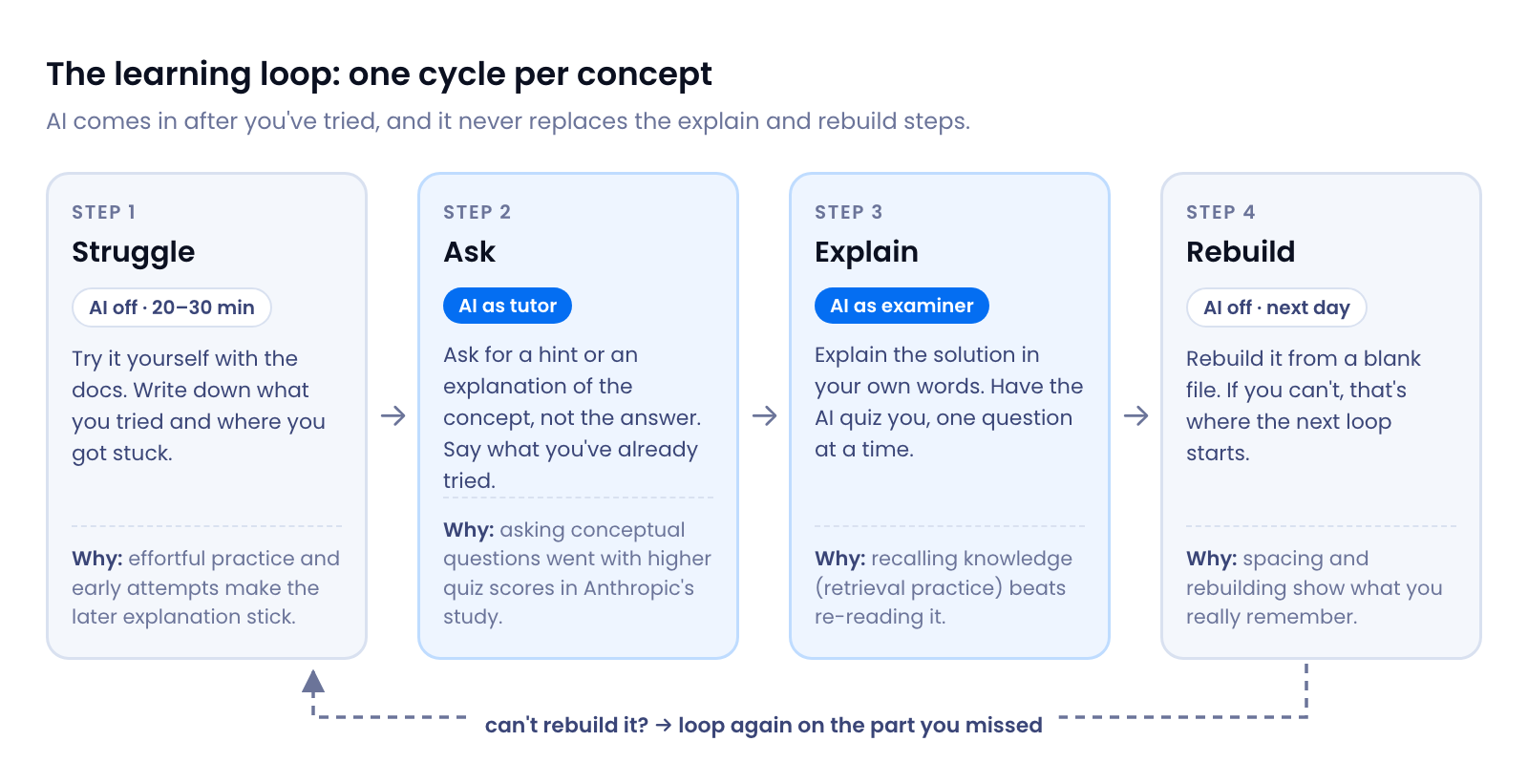
Every concept in the roadmap goes through the same four steps:
- Struggle (AI off, 20–30 minutes). Try it yourself with the official docs. Write down what you tried and exactly where you got stuck. The time box is a rule of thumb, not a magic number: long enough to think, short enough not to waste an evening.
- Ask (AI as tutor). Now open the AI. Ask for a hint or a concept, not a solution, and include what you tried. That turns the AI from an answer machine into a teacher.
- Explain (AI as examiner). Once it works, explain why it works in your own words, then ask the AI to quiz you. If you can't explain a line, you don't own it yet.
- Rebuild (AI off, next day). Open a blank file and rebuild it from memory. Where you get stuck is exactly what to study next.
The loop is slower per task, and that's the point. You're optimising for what you can do in month six, not for how fast you finish today.
Set up your AI as a tutor, not a code generator#
Most assistants let you save standing instructions: custom instructions in ChatGPT, a Project in Claude, or an instruction file such as CLAUDE.md or AGENTS.md that coding agents read from your repository. Paste this in once and every conversation starts in tutor mode:
You are my programming tutor, not my code generator. I am learning backend
development with PHP, Laravel and MySQL. My goal is to understand, not to finish fast.

Rules:
1. Never write the full solution to an exercise unless I write "SHOW SOLUTION".
2. When I'm stuck, ask what I have tried, then give the smallest useful hint.
   If I'm still stuck, give a bigger hint. Escalate slowly.
3. When I share code, ask me to predict what it does before you explain it.
4. When I share an error, ask me what I think the message means before you explain.
5. Review my code like a senior engineer: point out bugs, security issues,
   N+1 queries and unclear names, but let me fix them myself.
6. After I solve something, ask me two questions that check I understand WHY it works.
7. If I say "quiz me", ask one question at a time and wait for my answer.
8. If something I ask for is a bad practice, tell me and explain why.
And for step 3, use the AI as an examiner:
Quiz me on [topic, e.g. "Eloquent relationships and eager loading"].
Ask 5 questions, one at a time, and wait for my answer before the next one.
Mix the types: predict the output, find the bug, explain why, and "what would
you change". After each answer, grade it (correct / partly / wrong) and explain
what I missed. At the end, list the 2 weakest areas I should practise.
The 12-week roadmap#
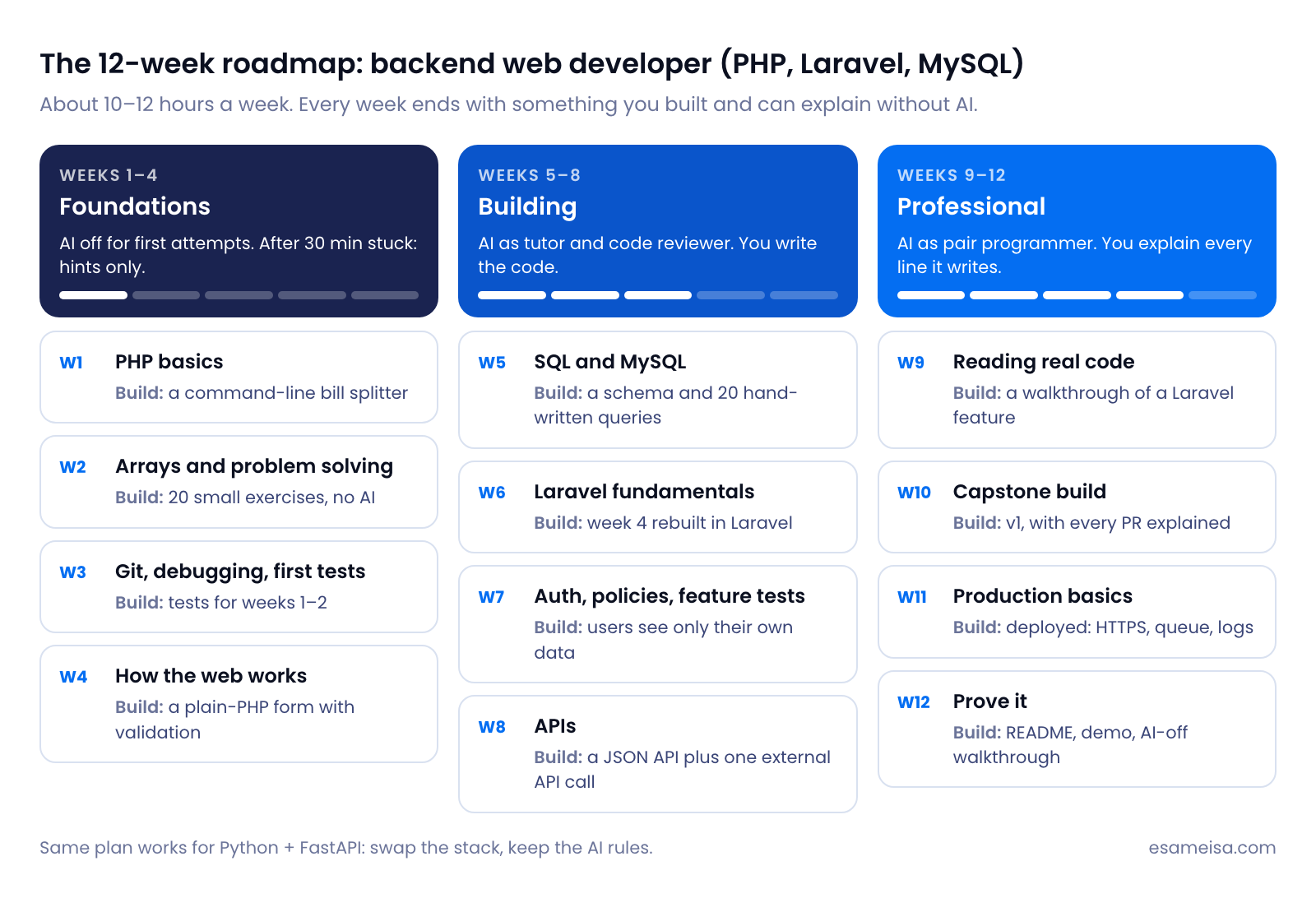
The plan targets backend web development with PHP, Laravel and MySQL, a stack that runs a large share of the web. If you prefer Python, swap in FastAPI and PostgreSQL and keep the AI rules exactly the same.
It assumes about 10–12 hours a week. If you have less, stretch each week to two; don't skip the rebuild days.
Phase 1: Foundations (weeks 1–4). AI off first, then hints only#
You are building the mental models everything else depends on. If AI writes these for you, you will never have them.
| Week | Learn | Build (your deliverable) | AI allowed for |
|---|---|---|---|
| 1 | Variables, types, conditions, loops, functions | A command-line bill splitter: names and amounts in, who owes whom out | Explaining error messages, after 20 minutes |
| 2 | Arrays, associative arrays, sorting and searching, basic complexity | 20 small exercises (FizzBuzz, word counts, grouping and so on) with no AI at all | Nothing. This week is your baseline |
| 3 | Git, reading stack traces, var_dump, Xdebug, first PHPUnit or Pest tests |
Tests for your week 1–2 code, pushed to GitHub with clear commits | Hints on test syntax |
| 4 | HTTP, requests and responses, forms, sessions, status codes | A contact form in plain PHP with validation and error messages | Concept questions ("what does a 302 do?") |
Phase 2: Building (weeks 5–8). AI as tutor and reviewer#
Now you learn the tools professionals use. You still write the code, and the AI reviews it.
| Week | Learn | Build | AI allowed for |
|---|---|---|---|
| 5 | Tables, primary and foreign keys, joins, GROUP BY, indexes basics |
A schema for a small library system and 20 queries written by hand | Reviewing your schema; explaining EXPLAIN output |
| 6 | Laravel routing, controllers, Blade, Eloquent, migrations, validation | Week 4's form rebuilt in Laravel. Compare the two and write down what Laravel does for you | Tutor mode; code review of your PRs |
| 7 | Authentication, authorization (policies), feature tests | A "my bookings" app where users can only see and edit their own data, with tests proving it | Review; suggesting test cases you missed |
| 8 | JSON APIs, API resources, pagination, calling an external API with timeouts and error handling | A JSON API for week 7, plus one external API call (weather or currency rates) that fails gracefully | Review; explaining HTTP client options |
Phase 3: Professional (weeks 9–12). AI as pair programmer, you verify#
This is how professionals work with AI today. The rule changes from "AI doesn't write code" to "AI may write code, but you must be able to explain and defend every line."
| Week | Learn | Build | AI allowed for |
|---|---|---|---|
| 9 | Reading real code: trace one request through Laravel; read an open-source package | A written walkthrough (README or blog post) of how one feature works internally | Explaining unfamiliar code after you've made your own notes |
| 10 | Building a real project end to end | Capstone v1, for example an appointment-booking app. Every PR description explains what the AI wrote and why it's right | Generate-then-explain: code + your explanation + its review |
| 11 | Queues, caching, logging, basic security (validation, authorization, secrets), deployment | Capstone deployed with HTTPS, one queued job and error logging | Pair programming; security review checklist |
| 12 | Communicating your work | A README with setup steps and decisions, a 5-minute demo video, and an AI-off walkthrough of your code with a friend or mentor | Mock interview questions, then answering them without AI |
A realistic week#
| Day | Time | What you do |
|---|---|---|
| Mon | 2 h | Read and watch the week's concept (official docs first), then do the Struggle step on the first exercise |
| Tue | 2 h | Ask step for whatever you got stuck on; continue building |
| Wed | 2 h | Build the deliverable |
| Thu | 1.5 h | Explain: AI quiz on the week's topic, then fix your weakest area |
| Fri | 1.5 h | Rebuild one piece from a blank file, AI off |
| Sat | 2 h | Finish the deliverable, write tests, push to GitHub, update your learning log |
| Sun | — | Rest. Spacing works when there's space |
Practise the skills AI can't give you#
The study's biggest gap was in debugging and reading code, so train those on purpose. Here are three exercise types to repeat every week. Try each one before opening the answer.
Exercise 1: predict the output#
Without running it, what does this print?
<?php
$numbers = [1, 2, 3];

foreach ($numbers as &$n) {
    $n = $n * 2;
}

foreach ($numbers as $n) {
    // nothing here
}

echo implode(', ', $numbers), PHP_EOL;
Show the answer
It prints 2, 4, 4, not 2, 4, 6.
After the first loop, $n is still a reference to the last element. The second loop assigns each value to $n, which means it writes into $numbers[2] every time: first 2, then 4, then the last element's own value, 4. The fix is unset($n); after the first loop. This is a classic PHP trap that AI-generated code can contain too, and you only spot it if you understand references.
Exercise 2: review AI-generated code#
Below is the kind of controller an assistant can produce when asked to "create an endpoint to place an order". Assume Order uses protected $guarded = [];. It works when you test it by hand with honest data.
Find at least five problems before reading the answer.
public function store(Request $request)
{
    $order = Order::create($request->except('items'));

    foreach ($request->items as $item) {
        $product = Product::find($item['id']);
        $order->total += $product->price * $item['qty'];
        $order->items()->create([
            'product_id' => $product->id,
            'quantity' => $item['qty'],
            'unit_price' => $product->price,
        ]);
    }

    $order->save();

    return $order;
}
Show the answer
I ran this code against a test suite, and each problem below was confirmed by a failing test:
- The client controls fields it shouldn't.
$request->except('items')with$guarded = []lets the request setuser_id,statusandtotal. In the test, a user created apaidorder on another user's account. - No validation. A quantity of
-2was accepted and lowered the total (the test order ended at 0). - Unknown products crash the request.
Product::find()returnsnullfor a bad ID, so$product->pricethrows a 500 error. - No transaction. When item 2 failed, item 1 and the order were already saved, leaving half an order in the database.
- One query per item (N+1). Product lookups grow with the cart: 2 items ran 6 queries, 10 items ran 22.
The reviewed version:
public function store(Request $request): JsonResponse
{
    $data = $request->validate([
        'items' => ['required', 'array', 'min:1', 'max:50'],
        'items.*.product_id' => ['required', 'integer', 'distinct'],
        'items.*.quantity' => ['required', 'integer', 'min:1', 'max:100'],
    ]);

    $items = collect($data['items']);
    $products = Product::whereIn('id', $items->pluck('product_id'))->get()->keyBy('id'); // 1 query, not 1 per item

    abort_if($products->count() !== $items->count(), 422, 'One or more products do not exist.');

    $order = DB::transaction(function () use ($request, $items, $products) {
        // user_id, status and total come from the server, never from the request.
        $order = $request->user()->orders()->create(['status' => 'pending', 'total' => 0]);

        foreach ($items as $item) {
            $product = $products[$item['product_id']];

            $order->items()->create([
                'product_id' => $product->id,
                'quantity' => $item['quantity'],
                'unit_price' => $product->price, // the database price, in minor units
            ]);

            $order->total += $product->price * $item['quantity'];
        }

        $order->save();

        return $order;
    });

    return response()->json($order->load('items'), 201);
}
With the same tests, the reviewed version ignores the injected fields, rejects bad quantities and unknown products with 422 without leaving any rows behind, and its product lookup is a single query however big the cart is.
Exercise 3: break it on purpose#
Take something that works, like your week 7 bookings app, and predict what happens when you remove one line: the policy check, a validation rule, an ->with() eager load, a database index. Then remove it and check. Write down whether you were right. This trains the "what if" thinking that code review and debugging depend on.
Measure yourself: the self-assessment rubric#
Every two weeks, score yourself honestly on each skill, using code from that period:
| Skill | 1: Not yet | 2: With AI | 3: Alone, with docs | 4: Could teach it |
|---|---|---|---|---|
| Explain: say what each line of your code does and why | ||||
| Predict: tell what code will do before running it | ||||
| Debug: find the cause of an error from its message and stack trace | ||||
| Rebuild: recreate last week's feature from a blank file | ||||
| Review: spot problems in code you didn't write (including AI's) | ||||
| Decide: explain trade-offs, e.g. why this query or this structure |
By week 12, aim for 3 or higher on everything. Anything stuck at 2 means AI is still doing that skill for you, so give it more "AI off" time.
Keep a learning log#
Ten minutes a day. It's your retrieval practice, your interview prep, and your proof of progress all in one:
## 2026-11-10 · Week 6, day 2

**Goal today:** Validate the booking form in Laravel.
**What I tried first (AI off):** Validation in the controller with if statements.
**Where I got stuck:** Showing old input after a failed validation.
**What I asked AI (and the hint I got):** "How does Laravel keep input after a redirect?"
  → Hint: look at the old() helper and how validate() redirects back.
**What I understand now, in my own words:** validate() throws a ValidationException;
  Laravel redirects back with errors and the old input in the session.
**AI-written lines I accepted, and why they're right:** none today.
**Tomorrow's rebuild:** the form + validation from a blank file.
**Confidence (1–4):** 3
Common mistakes#
| Mistake | Why it hurts | Instead |
|---|---|---|
| Asking for the full solution first | You skip the struggle that makes the explanation stick | Struggle for 20–30 min, then ask for a hint |
| Letting AI debug for you | Debugging had the biggest gap in the study, and you never build the skill | Read the stack trace yourself first; ask AI what a message means, not how to fix it |
| Measuring progress by features shipped | AI can ship features without you learning anything | Measure with the rubric, AI-off rebuilds, and quizzes |
| Never turning AI off | You can't see what you actually know | Keep one AI-off rebuild day every week |
| Tutorial and AI "binge" without projects | Recognition feels like knowledge but isn't | Every week ends with a deliverable you can demo |
| Avoiding AI completely | You miss the best tutor ever built, and AI fluency is now a job skill | Use the loop: AI comes after the attempt, not instead of it |
| Copying code you can't explain into a portfolio | Interviewers ask about exactly those lines | The one-sentence rule for every accepted line |
For mentors and team leads#
If you're onboarding juniors, the same rules work at team level:
- Ask "walk me through this" in code review. A junior should be able to explain any line in their PR, including AI-written ones. Make it normal, not a trap.
- Give debugging tasks, not just feature tasks. Assign a few real bugs early. Debugging is where AI dependency shows first.
- Reward explanations. A PR description that explains why the code is right is worth more than a big diff.
- Agree when AI is fine. Boilerplate, migrations, test data and docs lookups usually are. Core domain logic in someone's first months usually isn't.
Your checklist#
- Tutor instructions saved in your AI assistant
- Learning log started (ten minutes a day)
- Week 2 done with no AI at all, as your honest baseline
- Every concept goes through Struggle → Ask → Explain → Rebuild
- One AI-off rebuild day every week
- Every AI-written line you keep passes the one-sentence rule
- Debugging practised on purpose: read the trace before asking anyone
- Rubric scored every two weeks
- Capstone deployed, with a README that explains your decisions
- One AI-off walkthrough of your capstone with a mentor or friend
Key takeaways#
- AI can produce the evidence of learning without the learning. In Anthropic's study, learners using AI scored 50% vs 67% on a quiz afterwards, with the biggest gap in debugging.
- How you use AI matters more than whether you use it. Asking conceptual questions and questioning generated code went with high scores; delegating went with low ones.
- Keep the useful difficulty. Struggle first, ask for hints, explain it back, rebuild from memory.
- Bring AI in gradually: off and hints in weeks 1–4, tutor and reviewer in weeks 5–8, pair programmer with full explanations in weeks 9–12.
- Measure what AI can't fake: AI-off rebuilds, prediction, debugging and explaining your own code.
References and further reading#
- Anthropic: How AI assistance impacts the formation of coding skills (January 2026). The randomized trial with 52 engineers and the six interaction patterns.
- METR: Measuring the Impact of Early-2025 AI on Experienced Open-Source Developer Productivity (July 2025) and the February 2026 update
- Lee et al., The Impact of Generative AI on Critical Thinking (CHI 2025, Microsoft Research)
- Stack Overflow Developer Survey 2025: AI
- Bjork Learning and Forgetting Lab: desirable difficulties
- Roediger, H. L., & Karpicke, J. D. (2006). Test-Enhanced Learning: Taking Memory Tests Improves Long-Term Retention. Psychological Science, 17(3). doi:10.1111/j.1467-9280.2006.01693.x
- Manu Kapur: Productive Failure
- Laravel documentation and PHP manual. Your "Struggle" step starts here, not in a chat window.
Want someone to keep you on track? Following a roadmap alone is hard, and it's easy to fool yourself about what you really understand. If you'd like weekly code reviews, AI-off walkthroughs and honest feedback while you work through these 12 weeks, book a mentorship session.